
Deposits & Withdrawals
What Is a Withdrawal Address? Binance Address Checks Explained
A practical explanation of crypto withdrawal addresses, networks, memo or tag requirements, Binance address checks, and common mistakes.
A withdrawal address is the public blockchain address that receives cryptocurrency when you send it from an exchange or wallet. It is not your password, private key, or recovery phrase. You can share a public receiving address for a specific asset and network, but you should never share private credentials.

Why the address and network must match
A wallet address belongs to a blockchain network. When you withdraw, you select both the receiving address and a network. The receiving wallet or exchange must support that exact combination. Selecting the wrong network can delay recovery or permanently put funds out of reach.
Some assets also require a memo, tag, or similar destination identifier. The address identifies the wallet or platform; the memo or tag can identify your account within that platform. If the receiving service gives you both, enter both exactly as shown.
How to make a crypto withdrawal on Binance
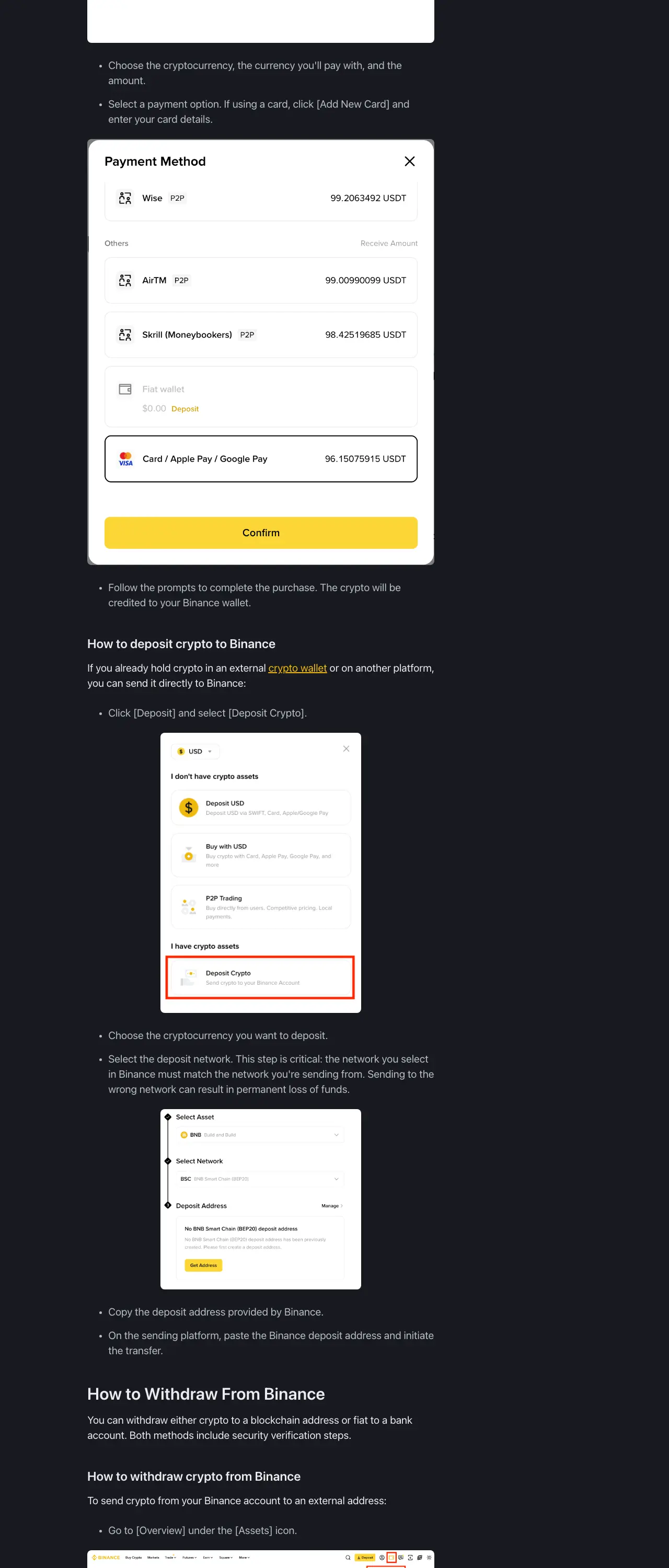
Binance's current public guide describes this general flow:
- Open Assets and go to Overview.
- Select Withdraw and choose the cryptocurrency.
- Paste the receiving address.
- Select the network supported by the receiving wallet or exchange.
- Enter the amount and include a memo or tag if the receiving service requires one.
- Review the address, network, amount, fee, and destination details.
- Complete the security checks requested by Binance.
Menu names and layouts can change by device, account, and region. Treat the instructions in your current Binance account as the final interface reference.
Withdrawal address checklist
Before you confirm, check each item:
1. Confirm the asset
Make sure you are sending the intended asset. A USDT address is not automatically interchangeable across every network, and an address format that looks familiar does not prove that the network is correct.
2. Confirm the network
Check the network on both sides of the transfer. If the receiving platform says to use a specific network, select that same network in Binance. Do not choose a cheaper network without confirming compatibility.
3. Compare the address
Use copy and paste where possible, then compare the first and last several characters with the receiving wallet. Be alert for malware or clipboard replacement. If the address changes after you paste it, stop and investigate.
4. Check the memo or tag
For assets or platforms that require a memo or tag, leaving it blank can cause a crediting delay or require support intervention. If the receiving service says no memo or tag is needed, do not invent one.
5. Review the amount and fee
Confirm the amount you want the recipient to receive and the network fee displayed before you approve the transaction. If the transfer is large or the destination is new, consider a small test transfer only when the asset and network make that practical.
6. Use address management carefully
A withdrawal whitelist or address-management feature can limit transfers to approved destinations. It reduces the chance of sending funds to an unauthorized address, but it does not fix a wrong address or wrong network that you approved yourself. Secure the email account used to approve new addresses.
Withdrawal address vs. bank withdrawal
A crypto withdrawal address is a blockchain destination. A fiat or bank withdrawal uses banking details and follows a different process. Do not paste a bank account number into a crypto address field, and do not assume that a crypto address can receive fiat.
What if you sent to the wrong address or network?
Crypto transfers are often difficult or impossible to reverse after confirmation. Save the transaction ID, asset, network, destination address, time, and screenshots of the confirmation. Contact the receiving wallet or exchange through its official support channel and ask whether recovery is technically possible. Do not send additional money to an unknown person promising guaranteed recovery.
If the transaction is still pending, check the transaction status and network explorer before taking another action. Sending a second transfer may create a second loss rather than repair the first one.
Common questions
Is a withdrawal address the same as a wallet address?
Usually, it is the public receiving address used for the withdrawal. The important distinction is that the address must be used with the correct asset and network.
Can someone steal funds with only my withdrawal address?
A public address is designed to receive funds and is not a private credential. However, sharing your address can expose its public transaction history. Never share your seed phrase, private key, password, 2FA code, or API secret.
Should I save every address in a whitelist?
Use address management for destinations you trust and use repeatedly, but verify every new address and network before saving it. A whitelist is an additional control, not a substitute for checking the transaction details.
Sources and update note
This guide follows Binance Academy's public deposit and withdrawal instructions and its explanations of address management and withdrawal whitelisting. Product flows, supported networks, fees, and security checks can change; confirm the current details in your Binance account before sending funds.
- Your Guide to Binance Deposit/Withdrawal
- 5 Ways to Improve Your Binance Account Security
- Binance Support Center
Risk notice: This article is for general education, not financial advice. Blockchain transfers can be irreversible; verify the asset, network, address, and memo or tag before confirming.